Role
Product Design Lead
Team
Microsoft Office · Tokyo
Platform
iOS · Android · Windows
Outcome
Google Play Best Apps of 2015
Overview
A scanner in every pocket
Office Lens turned your phone into a scanner. Point it at a whiteboard, a receipt, a business card, whatever, and it cleaned the shot up and dropped it straight into Word, PowerPoint, or OneNote. Google Play named it one of the best apps of 2015.
The origin
A back-end team’s first product
Microsoft’s office in Japan had spent about twenty-five years writing the code that sits under Office. Back-end work, nothing with their own name on it. Office Lens was the first product the team ever shipped, and I was one of the first two designers they’d ever had.
The problem was one everybody knew. You finish a meeting, the whiteboard is full of what you just worked out, and the next group is already at the door. There was no good way to keep it. You’d take a phone photo and it came out crooked and washed out, useless the next day.
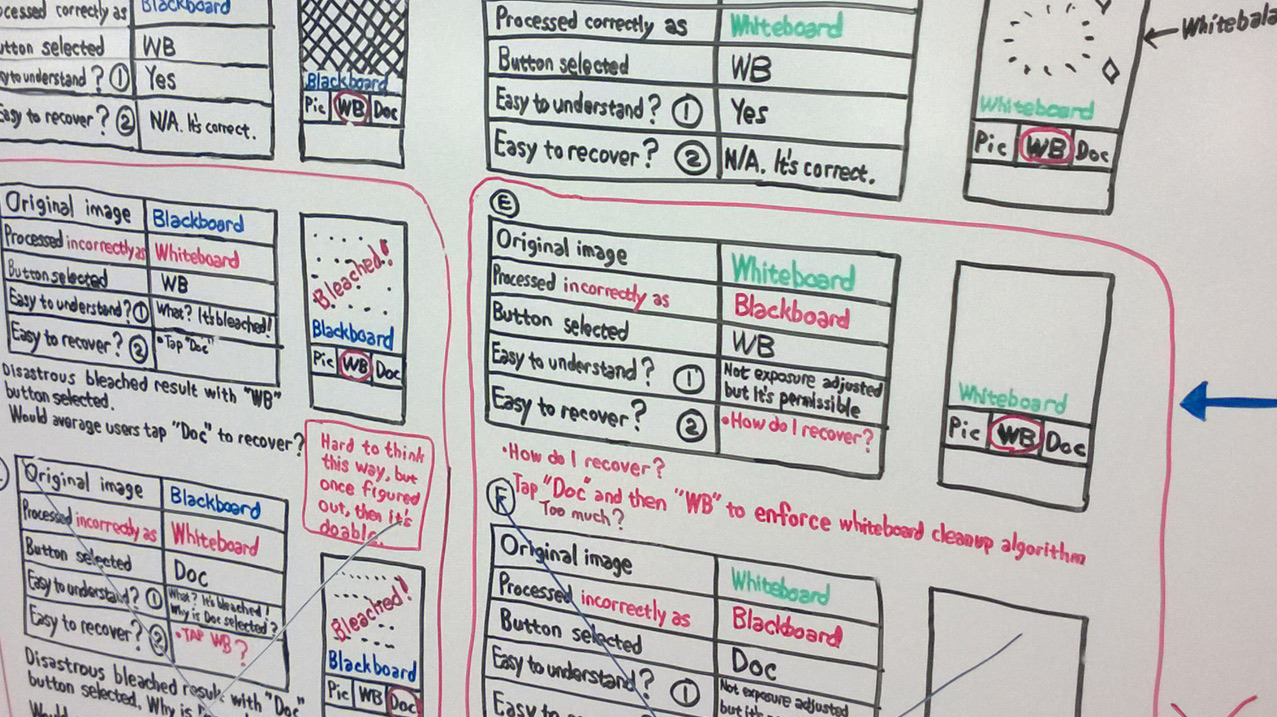
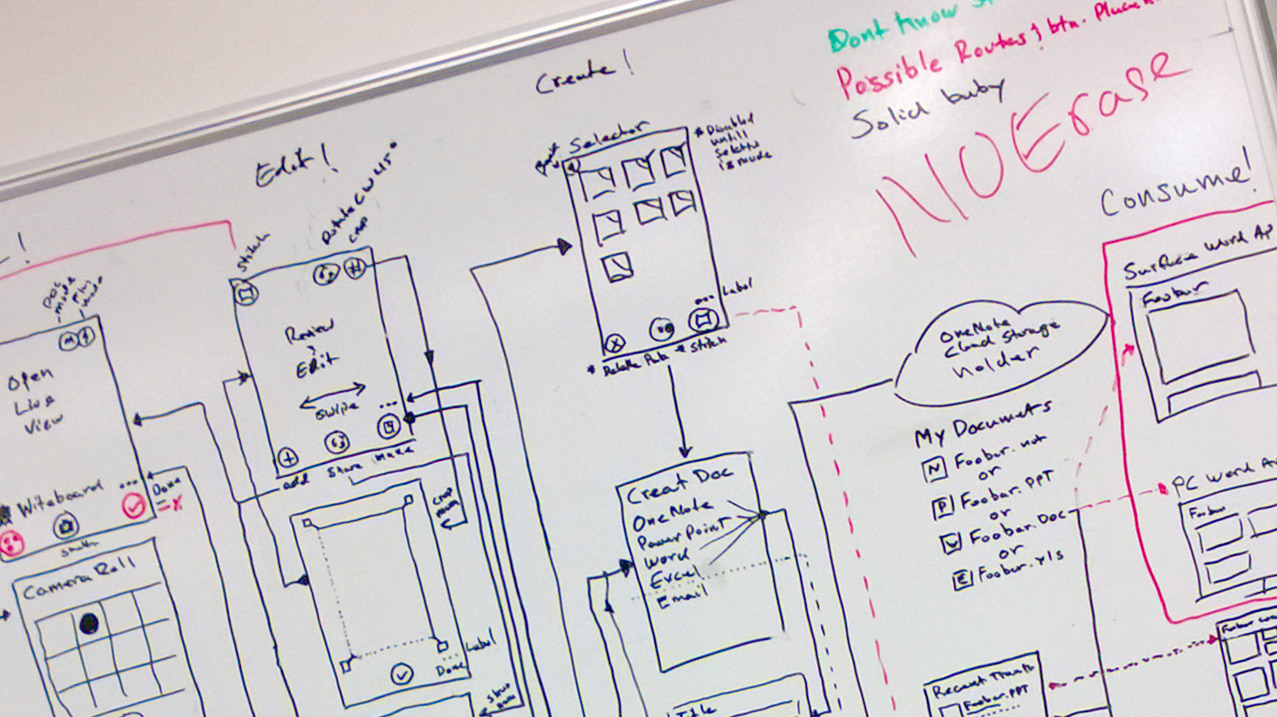
And we were mostly on our own. The cameras in 2013 weren’t good enough yet, so we started on Windows phones because the Nokia cameras were the best we had, then iOS, then Android once its cameras caught up. There wasn’t much to compare against either. CamScanner, and not a lot else. So we worked the flow out ourselves, mostly by arguing it out on the wall.
Who it was for
One frustration, a lot of voices
Underneath all of it was a single frustration: no reliable way to grab what’s in front of you and actually use it later. It surfaced as a handful of pain points, in people’s own words:
Pain points
- “I need to take clear photos of whiteboards in conference rooms at work and use them later.”
- “I need to be able to take a series of whiteboard photos quickly and confidently.”
- “I want to take an image of a whiteboard and annotate on it later.”
- “I need to take photos of documents that are readable.”
- “I need to take a photo of a form and sign and date it.”
I built the case around three of the people who lived it hardest — each wanting something completely different from the same product.
The whiteboard-capturer
Marcus, and the ten-second window
He lives in back-to-back meetings, watching the thinking on a whiteboard that’s about to get erased. For him, amazing is fast and trustworthy, under pressure.
Marcus Webb
Senior Program Manager · 38
“If it isn’t captured before the room clears, it didn’t happen.”
Amazing =Capture the thinking in seconds — and know it’s safe.
Goals
- Keep the thinking on a whiteboard from vanishing between meetings.
- Land it in OneNote, where the team already works.
- Shoot once, in seconds, and move on — no second takes.
Frustrations
- Phone photos of a whiteboard come out skewed and glare-blind.
- He’s never sure the shot was good until the board’s already wiped.
- Captures end up stranded in the camera roll, not his team’s notes.
The moment that matters
- The ten seconds between “meeting’s over” and “board’s wiped.”
- He needs to shoot once, trust it, and move on.
The user journey
From “there has to be a better way” to “you have to get this”
This is Marcus’s journey, start to finish — from the day he gave up on ever keeping a whiteboard, to the day he was the one telling his team to install it.
MWMarcus’s journeySenior Program Manager
01 · The problem
Worn down
“There has to be a better way”
Keeps needing to capture what matters — a whiteboard of decisions, a form to sign, a receipt — and every tool does it badly.
“A blurry photo I’ll never find again isn’t a system.”
02 · Discovery
Hopeful
A tool finally surfaces
A colleague swears by Office Lens — real capture built into the phone, straight into the apps he already lives in.
“If this actually works, it solves a dozen headaches at once.”
03 · First use
Skeptical
Puts it to the test
One shot at the real thing — on an angle, no time to aim. The app finds the edges for him.
“It’s paying attention — it saw the document, not the desk.”
04 · The doubt
On edge
Can I trust it?
The make-or-break touchpoint: did it really catch it, straight and readable?
“If I can’t trust the capture, I won’t come back.”
→ The verify step hands him control — check and fix before it commits. It doesn’t hope; it lets him be sure.
05 · It just works
Relief
Done — and done right
Clean, de-skewed, filed in OneNote; a PDF he can sign, date, and send — no scanner, no retyping.
“It treated my document like it mattered.”
→ Auto clean-up, OCR, and OneNote make the capture useful everywhere, instantly.
06 · Advocacy
Pride
“You have to get this”
Back at his desk — and at dinner — he’s the one recommending it to the whole team.
“How did I work without this? I’m telling everyone.”
It all hinged on one moment: the doubt right after you take the shot. Give people a way to check it themselves instead of just hoping, and “fed up” turns into “you have to get this.”
The occasional signer
Elena, and the form due today
Elena isn’t racing a calendar. She’s a freelancer with a contract to sign and no scanner anywhere in her life. For her, amazing means it looks legitimate without the errand — a document that reads as official, sent in two minutes.
Elena Ruiz
Freelance consultant · 41
“I don’t own a scanner. I own a phone and a signature.”
Amazing =A signed, dated PDF that looks official — sent in two minutes.
Goals
- Turn a signed page into a clean, official-looking PDF.
- Send it back the moment it’s signed — no print shop.
- Never look like she photographed a contract on the counter.
Frustrations
- Forms arrive needing a signature and there’s no scanner for miles.
- Phone photos of documents come out crooked and unprofessional.
- The print → sign → scan → email loop eats an afternoon.
The moment that matters
- A contract lands at 4pm that must be signed and returned today.
- She’s at her kitchen table, not an office.
The user journey
A signed page that reads like a scan
Elena’s journey looks nothing like Marcus’s. No clock, no panic. The whole thing turns on one quieter question: is this going to look legit, or like a photo I took on my counter?
ERElena’s journeyFreelance consultant
01 · The problem
Annoyed
“Not another print-sign-scan”
A form lands that needs a signature and a same-day return — and there’s no scanner in her life.
“Why is signing one page still an afternoon?”
02 · Discovery
Hopeful
“My phone can do this?”
Hears Office Lens turns a phone photo into a real, clean PDF.
“If it looks official, I never print again.”
03 · First use
Tentative
One photo, kitchen table
Signs the page and photographs it where she’s sitting — no lightbox, no scanner.
“Let’s see what it does with bad lighting.”
04 · The doubt
Skeptical
“Will this look legit?”
The make-or-break: does it read as a scanned document, or a crooked phone snap?
“I can’t send a client something that looks photographed.”
→ Answered by de-skew + clean-up — it becomes a document, not a photo.
05 · It works
Relief
“Looks like I scanned it”
A crisp, straight, dated PDF — signed and sent from the table in two minutes.
“That’s indistinguishable from a real scan.”
→ Answered by PDF export to OneDrive — it leaves as a professional artifact, instantly.
06 · Advocacy
Pride
“You don’t need a scanner”
Tells every freelancer she knows to ditch the print-sign-scan ritual.
“I threw my scanner away.”
Speed doesn’t win Elena. The two seconds of clean-up that turn a photo into a document she’d put her name on, that’s what does. Same product, a completely different definition of a win — and the design had to earn every one.
The business traveler
Sam, and the report every trip leaves behind
Sam isn’t racing a whiteboard or signing a contract, and he isn’t a mess — he’s meticulous. A folder for every trip, receipts and business cards kept in order. But even a tidy folder still has to become a filed report before the next trip, and that’s the chore that eats his evening. For him, amazing is his own system, running in minutes instead of a night — receipts into one clean report, cards straight into his contacts, the paperwork off his shoulders.
Sam Reyes
Regional Sales Manager · 44
“I keep a folder for every trip. Filing it still eats an evening I don’t have.”
Amazing =A trip’s receipts and cards handled in minutes, not an evening — the burden off his shoulders.
Goals
- Turn each trip’s receipts into one submittable report.
- Capture them as they happen, so a trip’s squared away before the next.
- Get the business cards he collects into his contacts, not a rubber band.
- Keep a digital copy and still hand Finance the originals.
Frustrations
- Even kept in order, thermal receipts fade before he gets to file them.
- Shooting them one by one — crooked and unreadable — is its own chore.
- A rubber-banded stack of business cards that never makes it into the CRM.
- Finance kicks back anything blurry, and reconciling a trip eats an evening.
The moment that matters
- The last night of a trip, when the receipts have to be organized and filed.
- He needs a folder of receipts to become a submitted report in one pass.
The user journey
The filing that stopped being his job
Sam isn’t disorganized — he’s the opposite. His pain is the burden: even a tidy trip folder still has to be turned into a filed report by hand, and that’s the evening Office Lens hands back to him. Watch where his arc lifts — not at the capture, but the moment the filing stops being his job.
SRSam’s journeyRegional Sales Manager
01 · The problem
Weary
The one chore left
His folder’s in order — but turning it into a filed report by hand still costs him the evening.
“I’m organized. It still eats my night.”
02 · Discovery
Hopeful
“I can shoot them all?”
Hears Office Lens can photograph receipts and drop them straight into a document.
“If I can do a whole trip at once, I’m done before I land home.”
03 · First use
Testing
Hotel desk, 11pm
Spreads the trip’s receipts out and shoots them one after another; the app finds each edge and cleans it up.
“Let’s see if it can keep up.”
04 · The doubt
Wary
“Will Finance take these?”
The make-or-break: do these read as real receipts, or phone snaps that’ll get bounced?
“If one’s unreadable, the whole report comes back.”
→ Answered by auto crop + clean-up — each receipt straight, sharp, and dated, not a photo.
05 · It works
Relief
One report, done
Every receipt lands in OneNote, in order, and exports as one PDF he can send straight to Finance; the business cards he collected go right into his contacts.
“A trip’s paperwork, done before I’m home.”
→ Answered by batch capture into OneNote — the whole trip exports as one clean PDF, off to Finance in a single submission.
06 · Advocacy
Pride
Tells the whole team
Shows the sales team at the next kickoff.
“Nobody on my team types receipts anymore.”
For Sam it was never a mess to clean up — he was already organized. It was a burden to lift: a trip’s folder turned into a filed report, out to Finance in minutes instead of a night. A third “amazing” entirely: not speed, not legitimacy, but a good system made effortless.
The reframe
Not a faster camera — trust in two seconds
Take the technology out of it for a second. The perfect version of this is that you never think about it. You glance at the board, it’s already saved, clean and straight, and you know it’s right. No shutter, no checking, no second-guessing. That’s what a person actually wants.
In 2013 we couldn’t hit that. The edge detection wasn’t good enough to trust on its own. So the real problem was never “make the camera faster.” It was the gap between that invisible version and what the tech could honestly do, and the only thing that closes that gap is trust. My job was to make the one step we couldn’t skip, the check, feel like the app looking out for you instead of the app not being sure.
01 — The hard call
Speed vs. trust
This is the call I fought hardest for. Auto-saving every frame would have been faster, sure. It also would have confidently saved a pile of garbage.
So I put a check in the middle of the flow. Take the shot, look at the crop, fix it if it’s off, then save. It cost a little speed and bought the one thing the whole journey hinged on, which was trust.
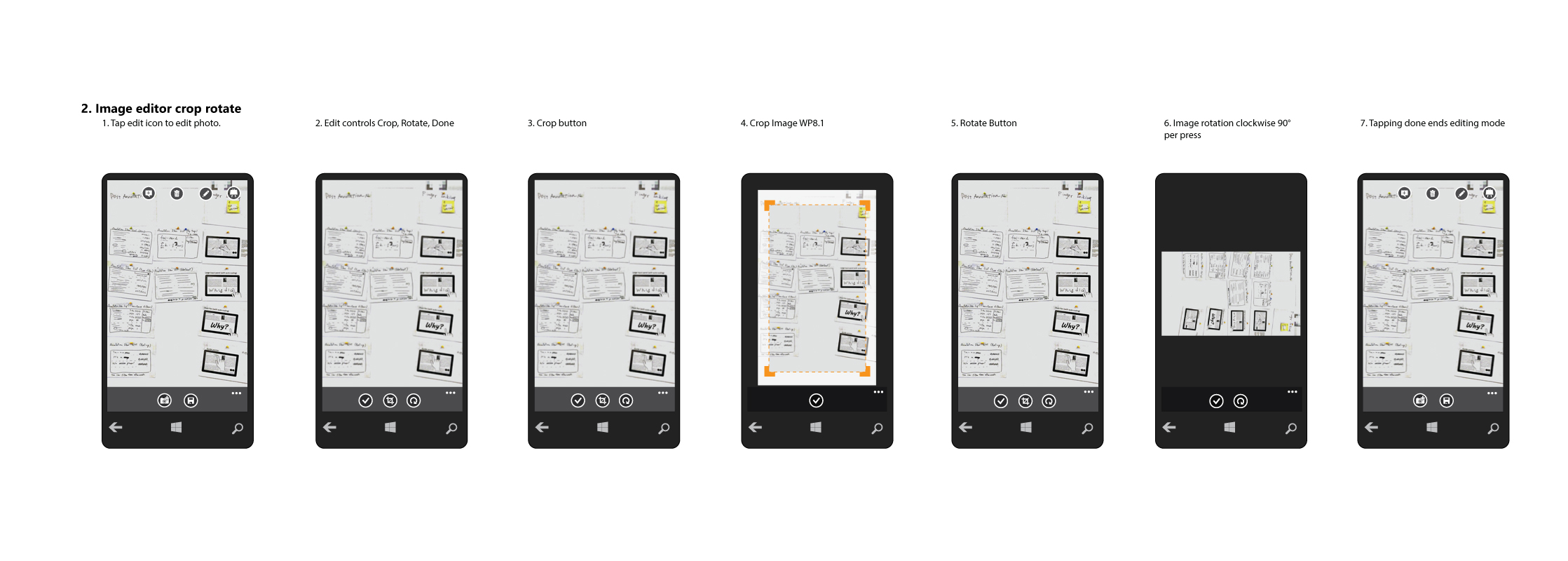
I spent two seconds of speed to buy the one thing the product couldn’t fake — trust.
The smaller calls
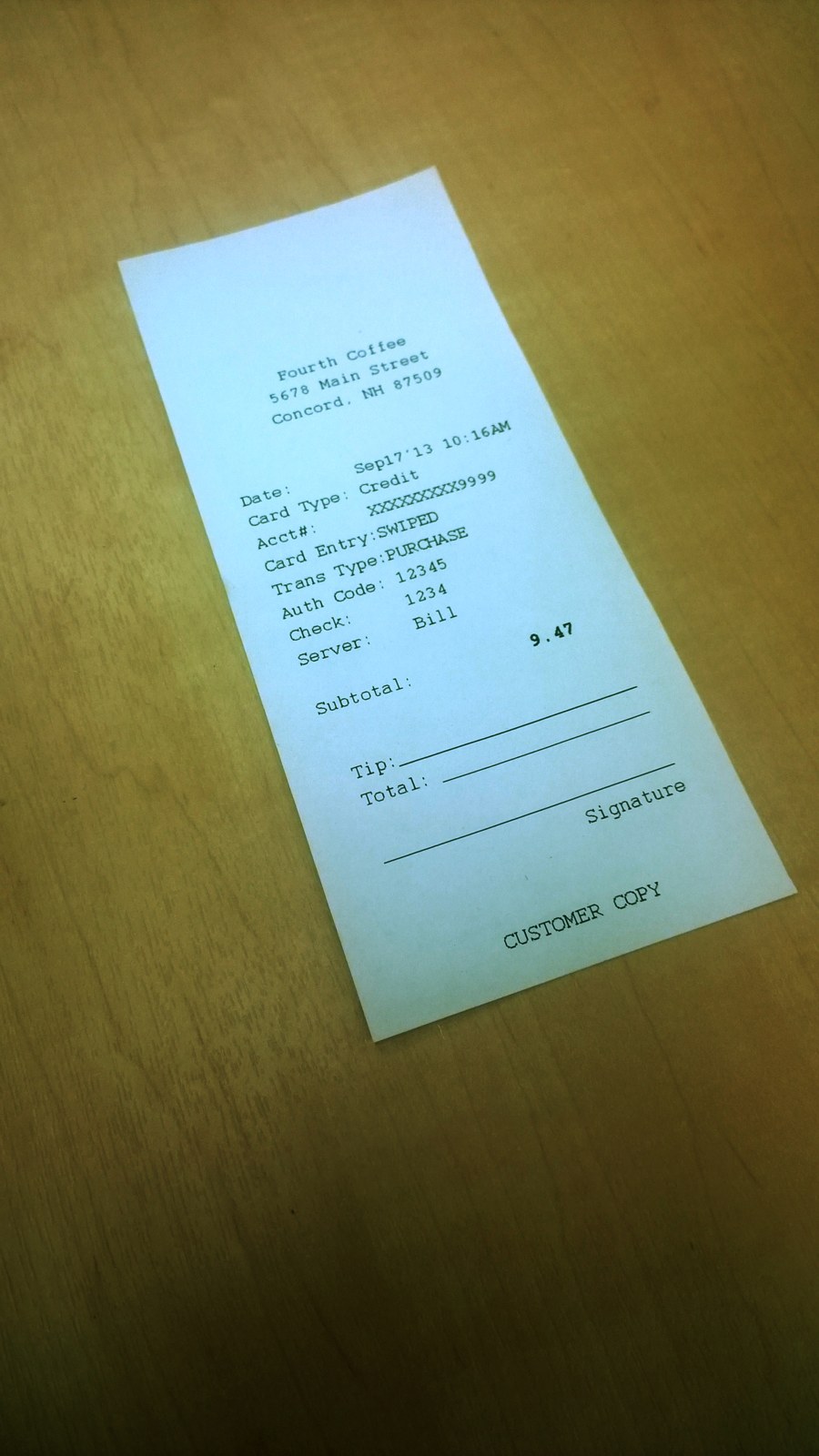
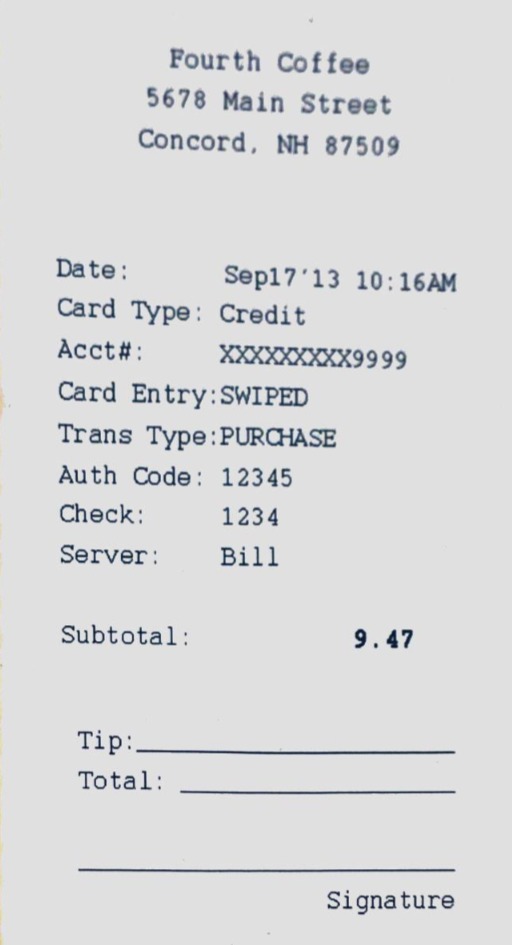
- Save it in both places.Keep a re-croppable photo on the phone and a copy in OneDrive/OneNote. Nobody should have to choose.
- Whiteboards you can still work with.Saved into OneNote as a vector so you could write on top of it, with OCR running on the text.
- The fight I kept having.The crop handles belong outside the corners, not sitting on top of the edge you’re trying to line up. Engineering didn’t get why it mattered until a later release finally fixed it. The small stuff is the design.
- What we chose not to ship.Stitching a big whiteboard together from a few shots. We tried it, it was clunky at the time, so we left it out. Knowing what to leave out is part of the job.
The team
One of the first two designers
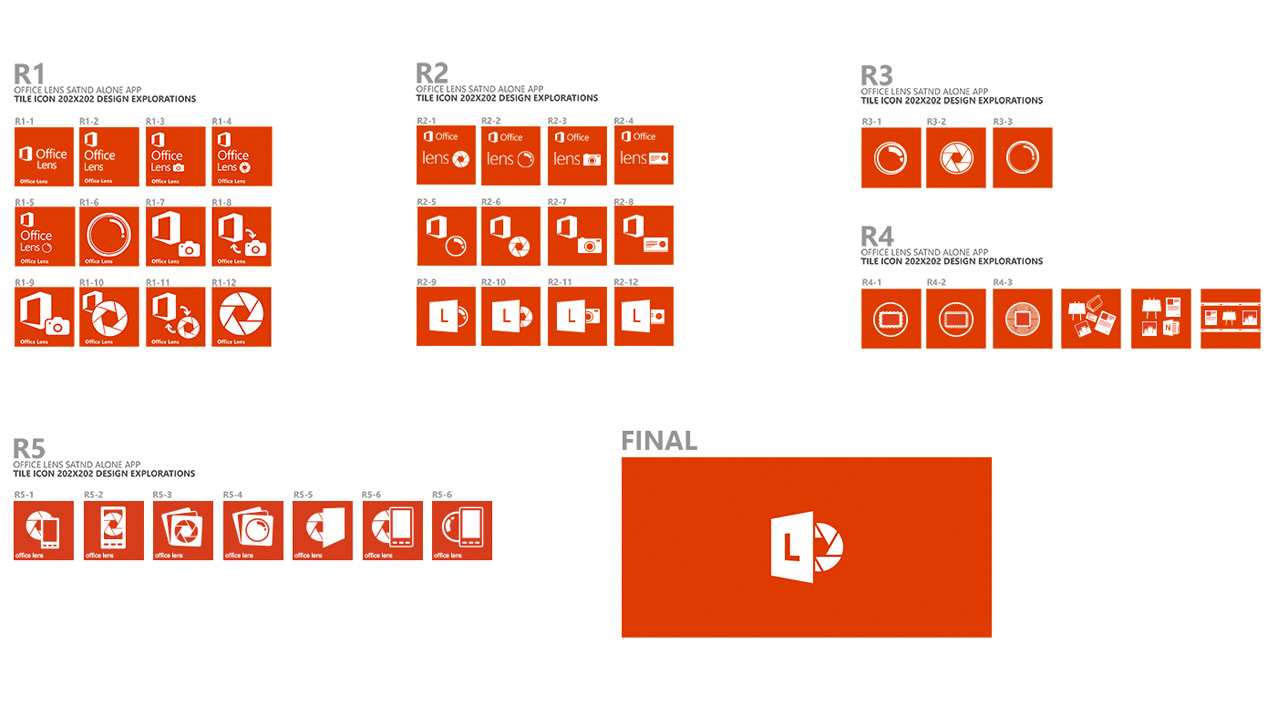
I took the design lead on Office Lens. Sixty-some engineers and PMs, twenty-five years of shipping back-end code, and before me exactly one other designer — on a team that had never worked with design at all. The executive director wanted a real design voice in the room, and that was the job: I ran the reviews, set the flow, and made the case for the user to sixty engineers and PMs who’d never had to think about one. We reported into research, so research settled the tie-breaks, not the loudest opinion. I designed the product icon too — a central team owns final asset production, but the mark was mine.
Process
Made the work impossible to ignore
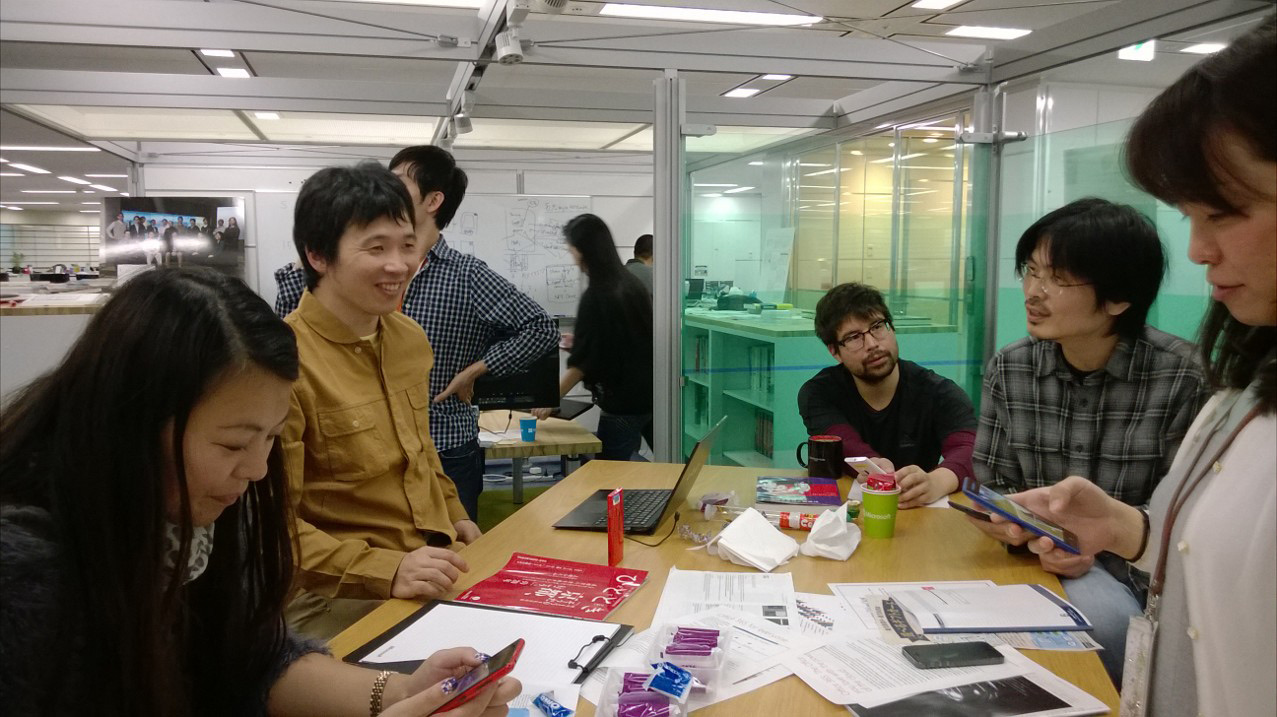
Reviews from day one, with research sitting right next to me. Quick feedback rounds and small usability tests in the office every sprint. And printouts from the floor to the ceiling on the studio walls, so the whole team could grab a pen and mark them up.
The flow
One outline, every platform
Boil the whole product down and it’s six steps. The third one, the check, is the one that earns the trust.
- 01CaptureOne shot, on an angle
- 02Detect edgesLive corner-finding
- 03Verify & adjustThe trust step
- 04Clean upDe-skew, sharpen
- 05Save to OneNoteOCR, searchable
- 06Use & shareWord, PPT, sign
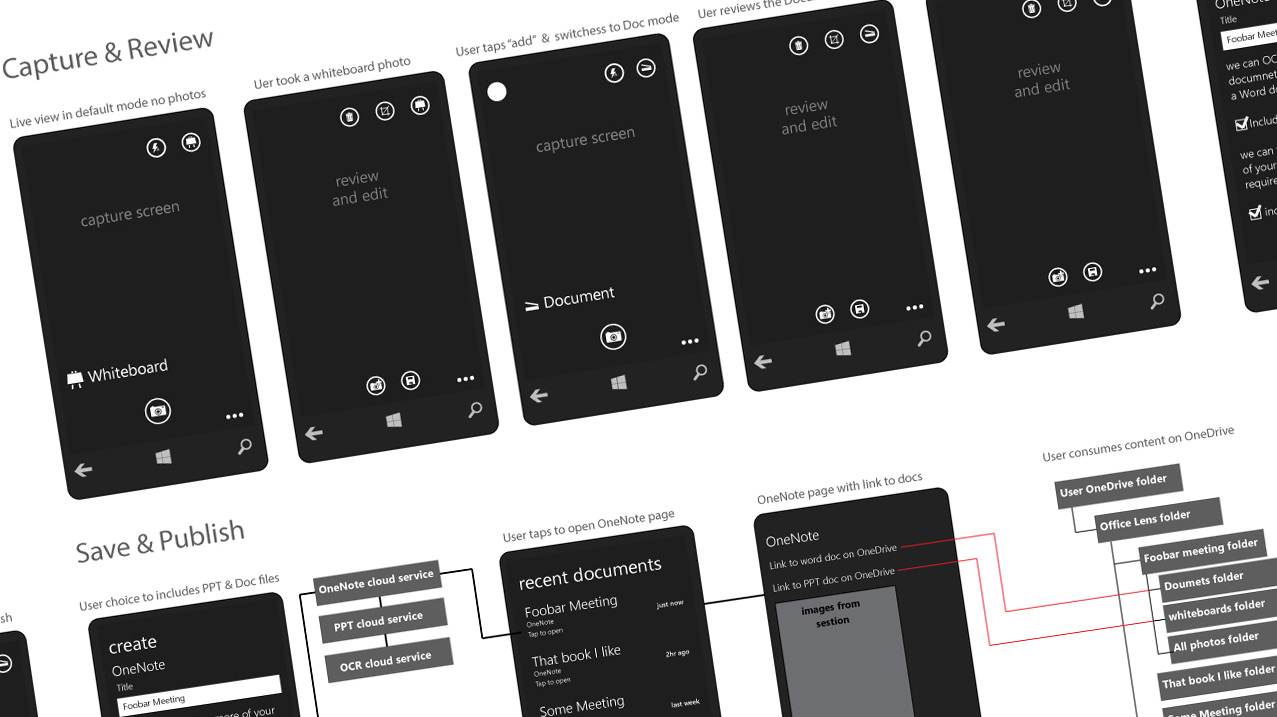
That’s the happy path — the six steps that mattered. Here’s everything that sat behind them:
The full outline
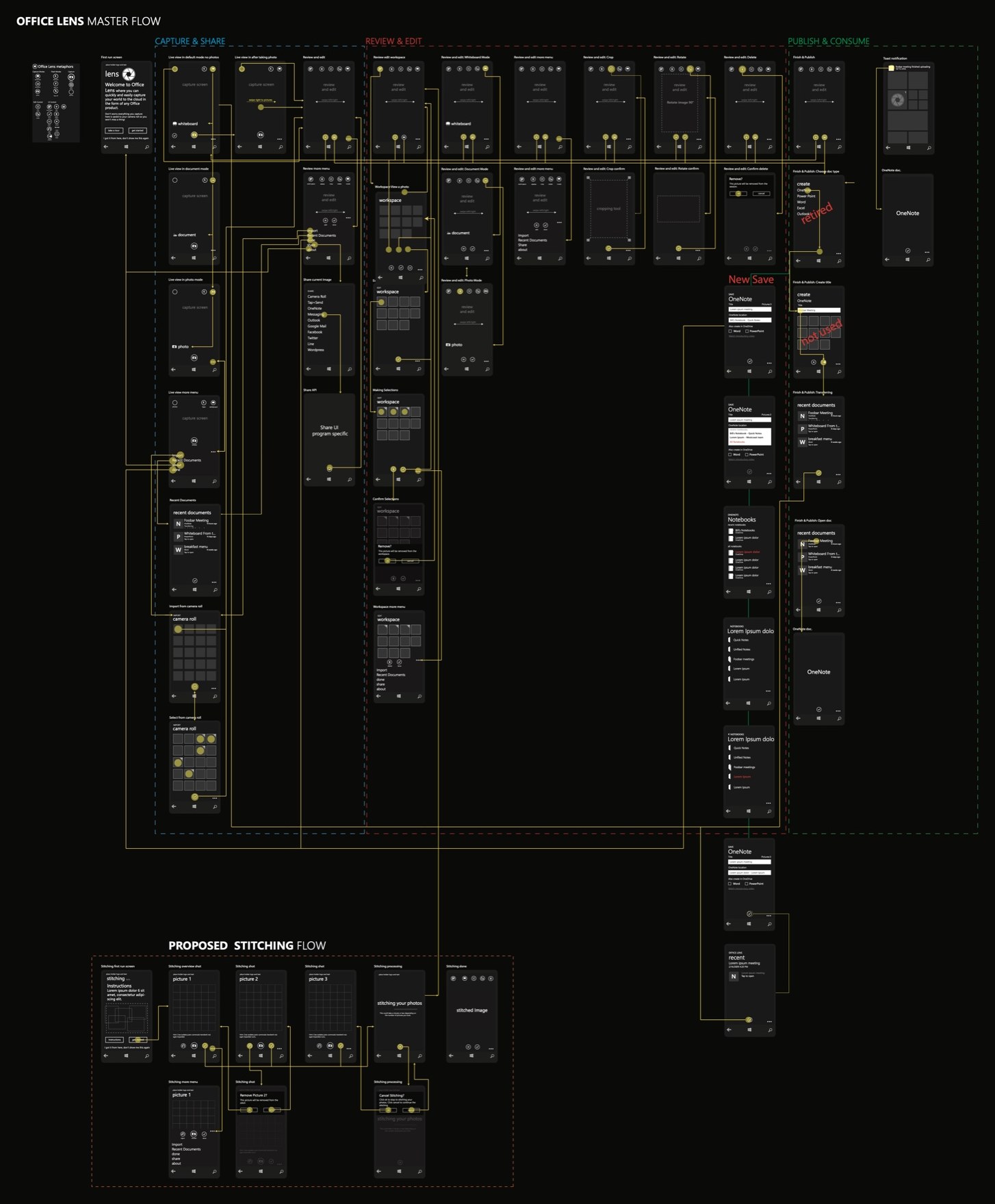
The entire product, on one page
Every screen, every state, every branch — capture, review, publish — across every platform. Drawn and argued out by hand, in Illustrator, no prototyping tools. This one outline is what let a back-end team ship the same product, coherently, on three operating systems.
Shipped
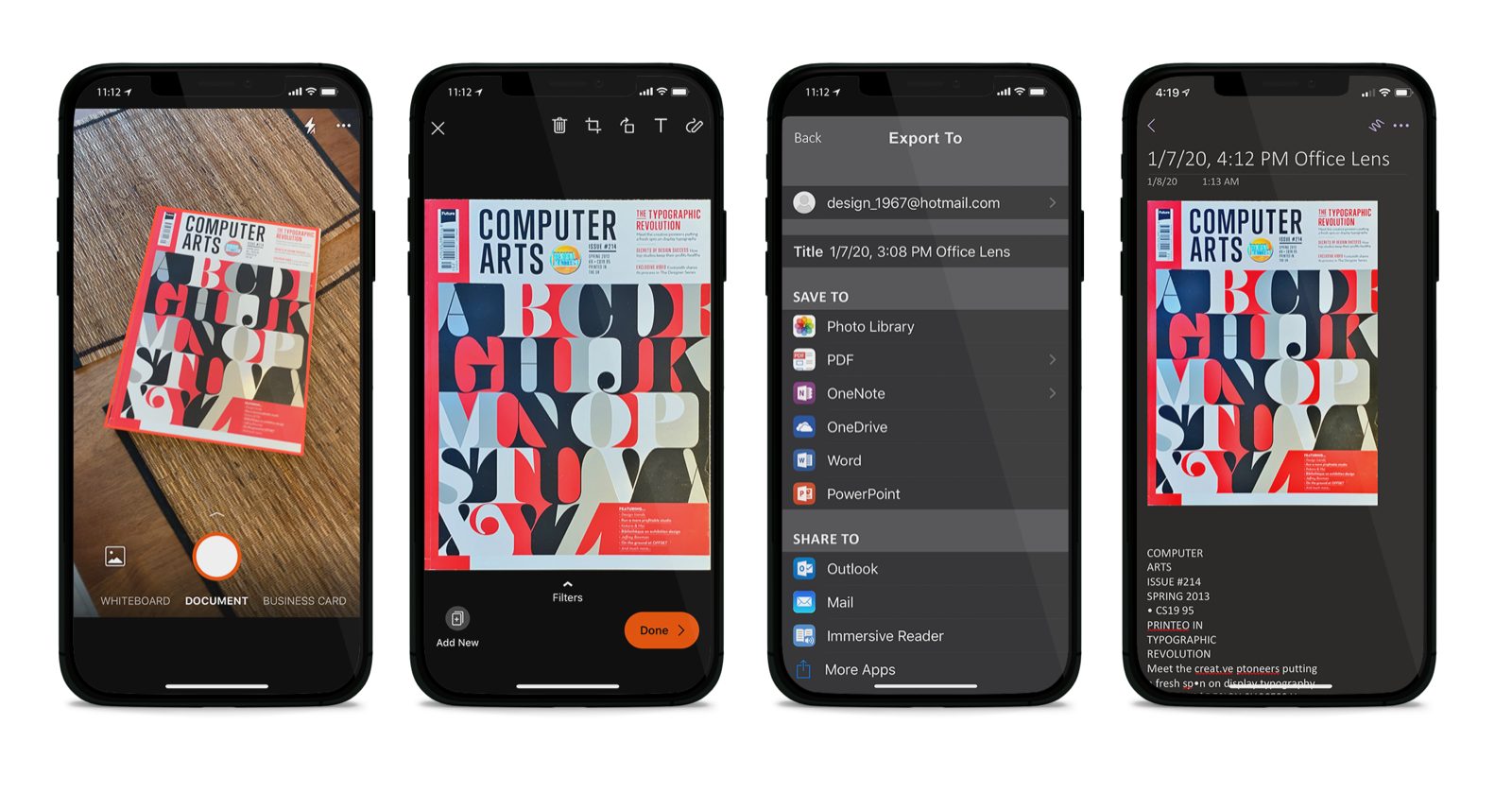
Into OneNote, instantly
Every capture landed in OneNote with OCR, so it was searchable, you could write on it, and it was backed up. Business cards went straight into your contacts. Shoot it once and it stays useful.
The loop closes
Advocacy came back as the brief
All three journeys end the same way, with somebody telling everyone they know. But that’s not the finish line. It’s the feedback that writes the next brief. The way people actually used Office Lens, way more documents than whiteboards, out and about, a lot of it offline, came right back to us and turned into the roadmap.
- 01People shared itReviews, word of mouth, “install this”
- 02We watched how they really used itDocuments > whiteboards, on the go
- 03We built the next version on itSharper capture, cloud + on-device
We sharpened document capture, brought in a dedicated imaging team, and moved the processing onto the phone and the cloud together to speed it up. Every release was answering how the last one actually got used. The people talking it up at the end of one journey wrote the problem statement for the next one. That’s the loop.
A scanner in your pocket — literally.I mean that literally. Office Lens put a real working scanner in anyone’s pocket, and for a decade it meant you didn’t need the one down the hall.
Outcome
A few things, done well enough to last a decade
Office Lens didn’t win by doing a lot. It won by doing a few things and getting them right: catch it, clean it up, drop it where people already worked. It stood in for the office scanner for a decade of them, picked up a Google Play best-of-2015 nod, and became one of Microsoft’s most successful stand-alone cross-platform apps. Later it got renamed Microsoft Lens and folded into Microsoft 365. The product’s gone now. The years of people it helped aren’t.
2015
Google Play Best Apps
3
platforms, one hand-drawn outline
1st
design voice on a 70-person team